
WordPress plugin · AI internal linking

Automatic internal linking for WordPress

You publish, Easy Content Linker links. Your articles point to one another automatically, so Google finds them and your readers stay.

  • Links are placed inside your own sentences, chosen by AI.
  • In both directions: from the new article to older ones, and from older ones back to it.
  • On every publish, without reopening the editor. No more orphan pages.

Reversible at any time: links are added when the page is displayed, your articles are never modified in the database.

No credit card · installed in 3 minutes · 7 languages

Every time you publish: the new article gets its links, and your older articles point to it.
7,836links placed on a single site
2,264articles analyzed
157duplicate articles spotted
The real problem

A site that publishes is a site whose links go stale

Internal linking is not a chore you fix once. It degrades the moment your site moves.

Without maintained linking

Insulation guide Attic costs 2026 grants Hiring a contractor New article

The new article is linked to nothing. Google finds it late, your readers never see it.

With Easy Content Linker

Insulation guide Attic costs 2026 grants Hiring a contractor New article

As soon as it is published, it receives links from your older articles and links back to them.

01

Your new articles arrive alone

None of your pages link to them. By the time you think of it, Google has already crawled them as isolated pages.

02

Your older articles ignore the new ones

Dozens of articles could point to your latest post. Nobody is going to reopen them one by one.

03

Manual linking always falls behind

At launch, you link everything. Six months of publishing later, the links no longer keep up.

Easy Content Linker does not pass over your site once and for all. It maintains your links for as long as you publish.

Why it matters

What well-placed internal links change for your site

Three concrete effects, for Google and for your readers.

Crawling

Articles found and indexed faster

Internal links are the paths Google's bots follow. The more there are, the faster your articles are discovered.

The details

A dense internal mesh reduces the number of clicks needed to reach each article (its “click depth”), speeds up crawling and indexing, and makes your page hierarchy clear to search engines. Fewer orphan pages, more articles actually counted in rankings.
Authority

Popularity directed to your key pages

Every internal link passes on a share of authority, the link juice. You choose where it concentrates.

The details

This is the principle of internal PageRank: by choosing which articles point to which page, you concentrate popularity where it counts. Grouping links by topic (silos) strengthens your key pages instead of diluting authority across the whole site: the basis of an effective internal linking strategy.

Readers

Readers who stay longer

A good link leads to the next article your reader wanted to read. More page views, less bounce.

The details

Beyond SEO, relevant links make reading more useful: they lead your readers to complementary content, increase page views and lower bounce rate. These are signals you track in Google Analytics, and they in turn strengthen your visibility in search engines.

How it works

Every time you publish, it gets to work

You set it up once. From then on, here is what it does on its own.

  1. 1

    You add your OpenAI key

    In the plugin settings. You pay OpenAI directly. GPT-5 mini (default) or GPT-5.2 picks the anchors; embeddings power the semantic analysis.

  2. 2

    AI reads your content

    For each article it computes an embedding: a fingerprint of its meaning. The plugin knows what every page is about.

  3. 3

    Related content is matched

    Articles on the same topic are linked based on a similarity score. Never a random link.

  4. 4

    The anchor comes from your text

    GPT finds the existing phrase that makes the best anchor. The link reads naturally, never “click here”.

  5. 5

    Links appear on display

    They are added when the page is shown. Your database is never modified.

  6. 6

    You stay in control

    Every link is listed in the history. Remove any of them in one click.

On a real site

What the plugin did on a 2,264-article site

Figures taken from an editorial site that publishes continuously. Not a demo: the plugin's own dashboard.

7,836internal links created
2,264articles analyzed
157duplicate articles spotted
0broken links
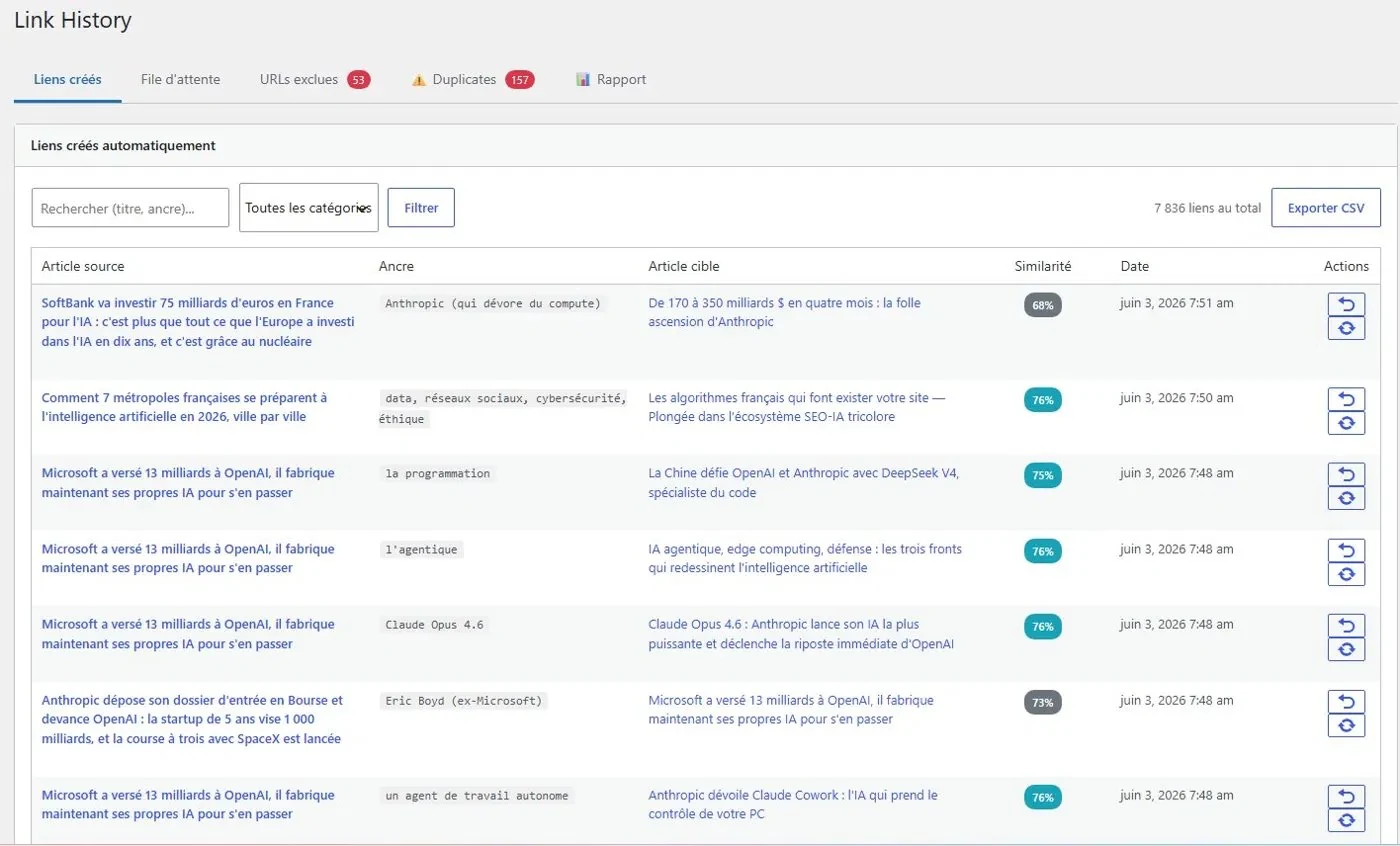
Easy Content Linker dashboard: internal linking history with automatically created links, their anchors and semantic similarity scores
Real dashboard screenshot: the 7,836 links placed on this site, each with its anchor, target page and similarity score. History exportable to CSV; every link can be removed in one click.

Start linking my site

Features

Everything you need for linking that lasts

Built for sites that publish often.

continuous

Linking new articles

Every new post is linked automatically, with no reminder needed. Your links never fall behind.

Semantic analysis

OpenAI embeddings understand the meaning of your content, not just keywords. Links point to the right page.

Anchors from your own text

GPT picks the existing phrase that makes the best anchor. No more “click here” or forced anchors.

monitoring

Orphan pages and duplicates

The plugin spots pages nothing links to, and near-identical articles ranked by risk (critical, high, moderate).

The details

For each duplicate it recommends a 301 redirect or a canonical tag. You deal with “cannibalization”, two articles competing for the same search, before it costs you rankings.

Strategic pages

Flag your most important pages (offers, guides, pages that earn money): they receive more internal links.

risk-free

100% reversible

Links are added on display. Your database stays intact; every link can be removed in one click.

Category silos

Your sections stay coherent

By default, the plugin links all your relevant content together. You can also restrict linking to each category, so every section links within itself: this is called a topic silo. Popularity stays concentrated in each topic instead of spreading thin, and the plugin applies the rule you set.

  • Strict silos (optional): turn on per-category linking whenever you like.
  • Category selection: choose which categories to include.
  • Flexibility: cross-category links by default, or strict silos to suit your strategy.
Multilingual

7 languages supported

The plugin works in the language of your content: AI picks anchors from your text and never translates it, and stop words (articles, prepositions…) are filtered for each language. The same link quality on all your sites.

  • Français
  • English (UK)
  • English (US)
  • Español
  • Deutsch
  • Italiano
  • Português
They use it

They no longer link their articles by hand

“A well-designed plugin that covers all internal linking needs quickly and relevantly. A must-have to optimize your site's SEO at lightning speed.”
Jérôme Pasquelin
Trainer and site publisher
“374 links generated across 400 articles, clean and consistent. Near-duplicate detection is a real SEO asset: I cleaned up my duplicates efficiently. Very easy to get started, immediate time savings.”
Emmanuel Lecoq
Project manager, Linksgarden
“Finally an internal linking plugin where I did not spend 3 hours configuring keywords. Set thresholds, max links, and go. A gem, simple and clear interface.”
David Depierris
Djibouteam

Testimonials translated from French.

The approach

Linking by meaning, not by keywords

Most internal linking plugins connect your articles by looking for exact keywords. Easy Content Linker connects them by what they are actually about.

Keyword-based plugins (Internal Link Juicer…)Easy Content Linker
What triggers a linkAn exact keyword found in the textHow close two articles are in meaning (embeddings)
AnchorsFixed, often unnaturalPicked by GPT from your existing sentences
What you configureKeyword lists, then fixing off-topic links by handNo lists: thresholds and a maximum number of links
Duplicates and cannibalizationNot detectedDetected and ranked by risk level
Pricing

Internal linking maintained all year

Start free, move to a license when your linking needs to keep pace with your publishing. Prices per year.

Free

To try it out

$0/year

  • 1 site
  • 50 articles maximum
  • 20 links per month
  • Anchor detection
  • Semantic analysis
  • Automatic linking (capped)
  • Not included: Category selection not included
  • Not included: Strategic pages not included
  • Not included: Duplicate detection not included
Start for free

Starter

For one site

$59/year

  • 1 site
  • Unlimited articles
  • Unlimited links
  • Unlimited automatic linking
  • Category selection
  • Strategic pages
  • Duplicate detection
Choose Starter

Agency

For agencies

$230/year

≈ $23 per site

  • 10 sites
  • Unlimited articles
  • Unlimited links
  • Unlimited automatic linking
  • Category selection
  • Strategic pages
  • Duplicate detection
Choose Agency
best value

Studio

For studios and multi-site publishers

$399/year

≈ $16 per site

  • 25 sites
  • Unlimited articles
  • Unlimited links
  • Unlimited automatic linking
  • Category selection
  • Strategic pages
  • Duplicate detection
Choose Studio

Enterprise

For site networks

$629/year

≈ $13 per site

  • 50 sites
  • Unlimited articles
  • Unlimited links
  • Unlimited automatic linking
  • Category selection
  • Strategic pages
  • Duplicate detection
Choose Enterprise

A license keeps unlimited automatic linking running all year. Without renewal, you drop back to the free version: your links stay in place, but linking is capped at 50 articles and 20 links per month, without strategic pages, duplicate detection or category selection. On a site that publishes a lot, linking no longer keeps up.

Secure payment by Stripe or PayPal, via Freemius · no credit card for the free version

Affiliate program

Earn 15% on every sale

Recommend Easy Content Linker and earn a commission on every license, renewals included. 30-day cookie, monthly PayPal payment.

Become an affiliate
FAQ

Frequently asked questions

Does internal linking really improve SEO?

Yes. Relevant internal links help Google discover and prioritize your pages, and guide your readers to other articles, which reduces bounce rate. It is one of the pillars of SEO on WordPress, and one of the simplest to put in place.

What is the difference between internal linking and link building?

Link building means earning links from other sites to gain authority. Internal linking organizes the links between your own pages. The two are complementary: link building brings authority, internal linking distributes it to the pages that matter. It is the only one of the two you fully control.

Does the plugin work on a very active WordPress blog?

Yes, that is where it helps most. The more you publish, the less manageable manual linking becomes. Easy Content Linker is built for sites that publish a lot: it links every new article automatically, which helps Google crawl it and rank it.

Does the plugin automatically link my new articles?

Yes, that is what it is for. As soon as an article is published, the plugin detects it, analyzes its content and places the relevant links in both directions: from the new article to your existing content, and from your existing content to it. No action needed from you.

Do I need to relaunch the plugin with every post?

No. You configure it once, then it runs in the background. You publish as usual; every link created appears in the plugin's history, with its anchor and target page, and the log details what was done.

Do I need my own OpenAI API key?

Yes: you pay OpenAI directly with your own key, with no middleman or markup on AI costs. In the settings you choose the model: GPT-5 mini (default, the most economical), GPT-5.2 (best quality) or GPT-4o (older model, deprecated by OpenAI).

How much does the OpenAI API cost?

With GPT-5 mini, expect around $0.20 to $0.50 per 100 links created; with GPT-5.2, roughly $1 to $3. The cost varies with the length of your articles. The actual cost, calculated from the tokens billed by OpenAI, is shown in the plugin dashboard.

Does the plugin modify my articles?

No. Links are added when the page is displayed. The content stored in your database stays intact, and every link can be removed in one click, with nothing to clean up.

Is it compatible with my theme and page builder?

The plugin works with every WordPress theme, the block editor (Gutenberg), the classic editor, Elementor, Divi, WPBakery and ACF fields: it only places links in text blocks, never in headings, buttons, menus or tables of contents. Beaver Builder and Oxygen are not supported yet: pages built with them receive no links.

What happens if I do not renew my license?

The plugin switches back to the free version: links already placed stay in place, but you are limited to 50 articles and 20 links per month, and the advanced features (strategic pages, duplicate detection, category selection) are disabled. On a site that publishes regularly, that cap is reached quickly: linking no longer keeps up. Renewing reactivates everything.

The next article you publish will already be linked.

Install Easy Content Linker, set it up once, and let your internal linking maintain itself with every post.

Try it free